Detailed transaction history
View every operation with its context, amount, asset and associated client. Gain traceability, readability and control over all transactions.
The problem
When a manager supervises multiple clients, multiple assets and multiple operations, it quickly becomes difficult to precisely trace each transaction in a clear and usable format.
CIYL's response
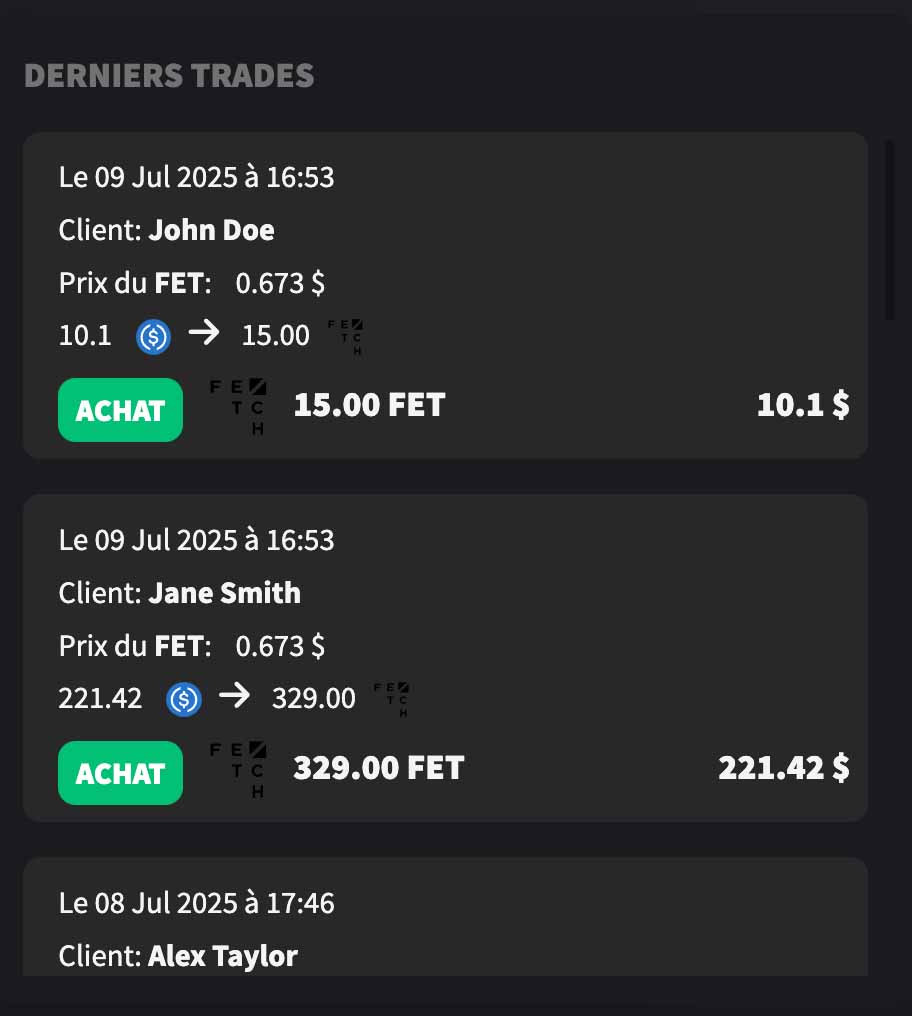
The detailed history centralizes each transaction with essential information: date, client, asset, price, quantity and operation type, in a readable and immediately usable view.
Precise reading of each transaction
A view designed to track operations over time, quickly understand what was executed and find each transaction without friction.
Every transaction becomes readable, verifiable and usable
The goal is not just to display a list of operations, but to make each movement understandable in its management context.
What is the detailed history for?
This feature allows you to quickly find a transaction, understand its characteristics and keep a clear trace of activity on portfolios.
- Find each transaction in chronological order
- Identify the client associated with an operation
- View execution price, amount and quantity
- Quickly distinguish operation types
- Facilitate verification and operational tracking
Why this feature is essential
Complete traceability
Each transaction is preserved with its key information to facilitate tracking and verification.
Immediate readability
Operations are presented in a clear format, without having to manually reconstruct the context.
Multi-client tracking
The manager can quickly see who did what, on which asset and at what time.
Operational control
Better visibility on activity helps reduce blind spots in daily management.
What the manager visualizes concretely
Essential information in one place
The view gathers the necessary elements to immediately understand a transaction without having to open multiple screens or cross-reference multiple sources.
- Date and time of operation
- Concerned client
- Asset processed
- Reference price
- Amount committed and quantity received
- Transaction type
A feature designed for operational tracking
The more activity increases, the more the ability to quickly reread transaction history becomes critical.
Typical use cases

Family office
Precise tracking of client operations - Quickly find transactions made on multiple portfolios in a single interface.

Manager
Quick verification of operations - Check recent purchases, sales or movements without wasting time in a dispersed history.

Reporting
Usable history for reporting - Support exchanges with a clear trace of operations carried out over time.
Complementary features
Complete transaction tracking with other traceability and reporting features.


FAQ
What information appears in the detailed history?
The history groups key information for each operation, such as date, concerned client, asset, price, amount, quantity and transaction type.
Can a recent operation be quickly found?
Yes. The view is designed to make transactions readable and easy to reread in chronological order.
Is this feature useful in a multi-client environment?
Yes. It specifically allows associating each operation with a client and keeping a clear reading of activity across multiple portfolios.
Why not just use a simple export or raw statement?
Because a structured view allows immediately understanding the context of a transaction, without reprocessing or manual reconstruction.
Keep a clear trace of every transaction
- Track every operation with its complete context
- Quickly identify transactions by client and asset
- Facilitate verification and operational control
- Improve traceability across all portfolios